Drayton Wiser Review: Is This the “Hidden Gem” of UK Smart Heating?
It’s cheaper than Tado and easier to install than Hive. We tested the Drayton Wiser system to see if this budget-friendly multi-zone solution is the best value smart thermostat on the market.
When you Google “best smart thermostat,” you are immediately bombarded with ads for Google Nest and Hive. They have the biggest marketing budgets and the flashiest designs. But ask a British plumber or heating engineer what they have in their own home, and a surprising number will say Drayton Wiser.
Owned by Schneider Electric, Drayton is a heritage brand in the UK heating industry. Their “Wiser” smart system doesn’t try to look like an iPhone; it tries to be a brilliant heating control system. It offers full multi-room zoning capabilities similar to premium rivals but often at a fraction of the price. Is it too good to be true? Does the plastic build quality let it down? We spent three months living with the system to find out.
Before we dive in, it’s worth understanding what a thermostat actually is and what features matter most when buying a smart thermostat. This review assumes you’re looking to upgrade from a dumb timer to a fully connected, multi-zone system—and that is precisely where Wiser excels.
What is Drayton Wiser?
Drayton Wiser is a modular smart heating system. It centers around the Heat HubR, a device that clips onto the wall where your old mechanical timer used to be. It connects wirelessly to a Room Thermostat and, crucially, to Smart Radiator Thermostats.
Like the Honeywell Evohome, Wiser is designed from the ground up for zoning. It allows you to control the temperature of every room individually. However, unlike Evohome, it doesn’t require a complex, expensive touchscreen controller—it runs entirely off a simple app.
Understanding how smart thermostat connectivity works helps you appreciate the elegance here. Wiser uses a Zigbee mesh network, meaning each device in the system acts as a relay, improving range and reliability without requiring a Wi-Fi signal in every room.

Drayton Wiser Smart Thermostat Heating Kit 1
The ideal starter kit for Combi boilers. Includes the Heat HubR and one Smart Room Thermostat. Expandable to 16 zones with radiator valves.
Check Price on AmazonHow It Works: The Technology Explained
At its heart, Drayton Wiser is a two-layer communication system. The Heat HubR connects to your home router via standard Wi-Fi (2.4GHz), while it communicates with all the thermostats and radiator valves using a low-power Zigbee mesh protocol.
Why Zigbee Matters
Unlike Z-Wave or Bluetooth, Zigbee is specifically engineered for battery-powered home automation devices. It uses far less energy than Wi-Fi (which is why the room thermostat can run for 18 months on two AA batteries). It also creates a self-healing mesh: if one radiator valve loses signal, the data can route through another valve to reach the hub.
If you want to understand this in more detail, our guide to how smart thermostat connectivity works breaks down Zigbee versus Z-Wave versus Wi-Fi for home heating systems. For Wiser specifically, the practical upshot is that it works reliably in large Victorian houses and thick-walled properties where Bluetooth-only systems fail.
The Heating Logic
The Wiser system uses a “TPI” (Time Proportional and Integral) control algorithm. Rather than simply telling your boiler “on” or “off,” it calculates precisely how long the boiler needs to fire to reach the target temperature without overshooting. This is a key reason it saves energy compared to a basic on/off thermostat—it avoids the energy-wasting cycle of heating a room to 22°C when you only wanted 21°C.
To understand the adaptive learning features that make smart thermostats different from programmable ones, think of TPI as the foundation. Wiser’s Eco Mode builds on top of TPI to learn the thermal properties of your specific home.
📡 Battery-Powered Smart Thermostats
The Wiser Room Thermostat is fully battery-powered, which means it can be placed anywhere in a room—not just where wiring happens to exist. If you’ve ever wondered what a battery-powered smart thermostat is and how it compares to wired alternatives, Wiser is a perfect case study: it trades some processing power for radical placement flexibility and genuinely easy installation.
Installation: The “Backplate” Advantage
This is Drayton’s killer feature. In the UK, millions of homes have a standard industry backplate for their boiler timer/programmer. The Drayton Wiser Heat HubR is designed to fit directly onto this existing backplate.
For many users, installation involves: 1. Unscrewing the old timer faceplate. 2. Loosening two screws. 3. Clipping the Wiser Heat HubR onto the existing plastic mount. 4. Tightening screws. Done. No rewiring. No touching mains electricity cables. It is genuinely plug-and-play for standard setups.
Compared to the complex wiring required for a Nest Heat Link (see our Nest vs Hive vs Tado comparison), this is a revelation for DIYers. However, always check compatibility first—if you have a gravity-fed system, you’ll need a different kit (Kit 2 or 3).
Step-by-Step: Full Wiser System Setup
For those fitting the complete system with radiator valves, here’s a detailed walkthrough:
Identify Your Boiler Type
Combi boiler (no separate hot water tank)? Use Kit 1. Conventional boiler with a cylinder? Use Kit 2. Two separate heating zones already? Kit 3. If you’re unsure whether your old thermostat will be compatible with your new system, our guide on thermostat and heating system compatibility covers what wiring to look for.
Replace the Heat Hub
Turn off the power to the boiler at the fuse spur. Unclip the old programmer faceplate. The Wiser Heat HubR clips directly onto the same backplate in most installations. Restore power. The Hub will blink teal as it initialises.
Pair the Room Thermostat
Download the Wiser Home app (iOS or Android) and create an account. The app will guide you through pairing the room thermostat via the Hub’s built-in pairing mode. This takes about 60 seconds.
Fit the Radiator Thermostats
Drain the system or use an isolation key (Wiser valves include one) to swap the existing TRV heads on each radiator. These simply unscrew and replace. No plumbing changes. If removing the old valves is difficult, consult our wiring and installation guide for tips on isolating individual radiators without draining the whole system.
Create Rooms in the App
In the Wiser app, create a “Room” for each space (Living Room, Bedroom 1, Kitchen etc.). Assign the relevant radiator valves to each room. Set schedules and target temperatures per room. You’re done.
The entire process for a three-bedroom home with eight radiators typically takes two to three hours, including app setup. A professional installer would take less than an hour. If you ever need to troubleshoot the installation or run into issues, our article on how to tell if your thermostat is bad can help you distinguish between a hardware fault and a setup problem.
Design & Build Quality
If there is a criticism of Wiser, it is the aesthetics. The components are entirely white plastic. They don’t have the glass elegance of Nest or the mirrored shine of Hive. The Room Thermostat is a simple square with a small colour screen that isn’t touch-sensitive (you use touch buttons on the side).
However, the design is unobtrusive. It disappears into a white wall. The room thermostat runs on AA batteries and comes with a stand or wall clip, allowing you to place it anywhere without wires. It prioritizes function over form, which keeps the cost down.
If the appearance of your wall controls is a genuine concern, you’ll find our round-up of thermostat cover ideas that blend into your home worth reading. Some of the custom frames and shadow boxes people create to house smart thermostats are genuinely elegant—and there’s no reason these couldn’t work around the Wiser room thermostat too. You might also consider the best wall colours to paint behind a thermostat to reduce visual prominence.
The Room Thermostat in Detail
The screen shows the current temperature, target temperature, and an icon indicating whether the boiler is currently firing. It’s clear and readable across a room. The lack of a touchscreen is compensated for by three physical touch-sensitive buttons on the right edge, which feel responsive and are easy to use even without reading the manual.
The stand is a particular highlight. Rather than being forced to drill into a wall, the weighted stand allows the thermostat to sit on a shelf, mantlepiece, or windowsill. This means the “best sensor location” (away from draughts, direct sunlight, and exterior walls) is actually achievable without any fixings. If you want to understand what a thermostat remote sensor is, the standalone room thermostat essentially functions as a high-accuracy remote temperature sensor for the central heating system.
The Smart Radiator Thermostats: A Clever Twist
Drayton’s radiator valves are arguably the best designed in terms of usability, even if they look basic.
- Twist to Boost: This is a feature we wish every smart valve had. If you walk into a cold room, you can physically twist the top of the valve cap. This boosts the temperature by 2°C for an hour. No need to unlock your phone or shout at Alexa. It’s tactile and intuitive.
- Silence: They are reasonably quiet. Not quite as silent as the Tado radiator valves, but certainly quieter than older Hive models.
- Battery Life: They use standard AA batteries and typically last 18-24 months, which is excellent.
Fitting and Adapters
The Wiser radiator thermostat is compatible with the vast majority of UK radiator valve bodies (Danfoss RA, Drayton, Honeywell, Myson, and more). The kit includes a range of adapters. In our testing, we found it fitted seven different valve types across our test properties without needing to source additional adapters—a significant practical advantage over some competitors.
One nuance: if your radiator valves are old and corroded, this is an excellent opportunity to replace the entire valve body while you’re working on the radiator. The new valve body will be far more responsive to the smart head, as worn valve pins are a common cause of rooms failing to heat correctly. If you find your home remains cold even after installation, our guide on why your house feels cold even with the heating on covers the most common causes—many of which are valve-related.
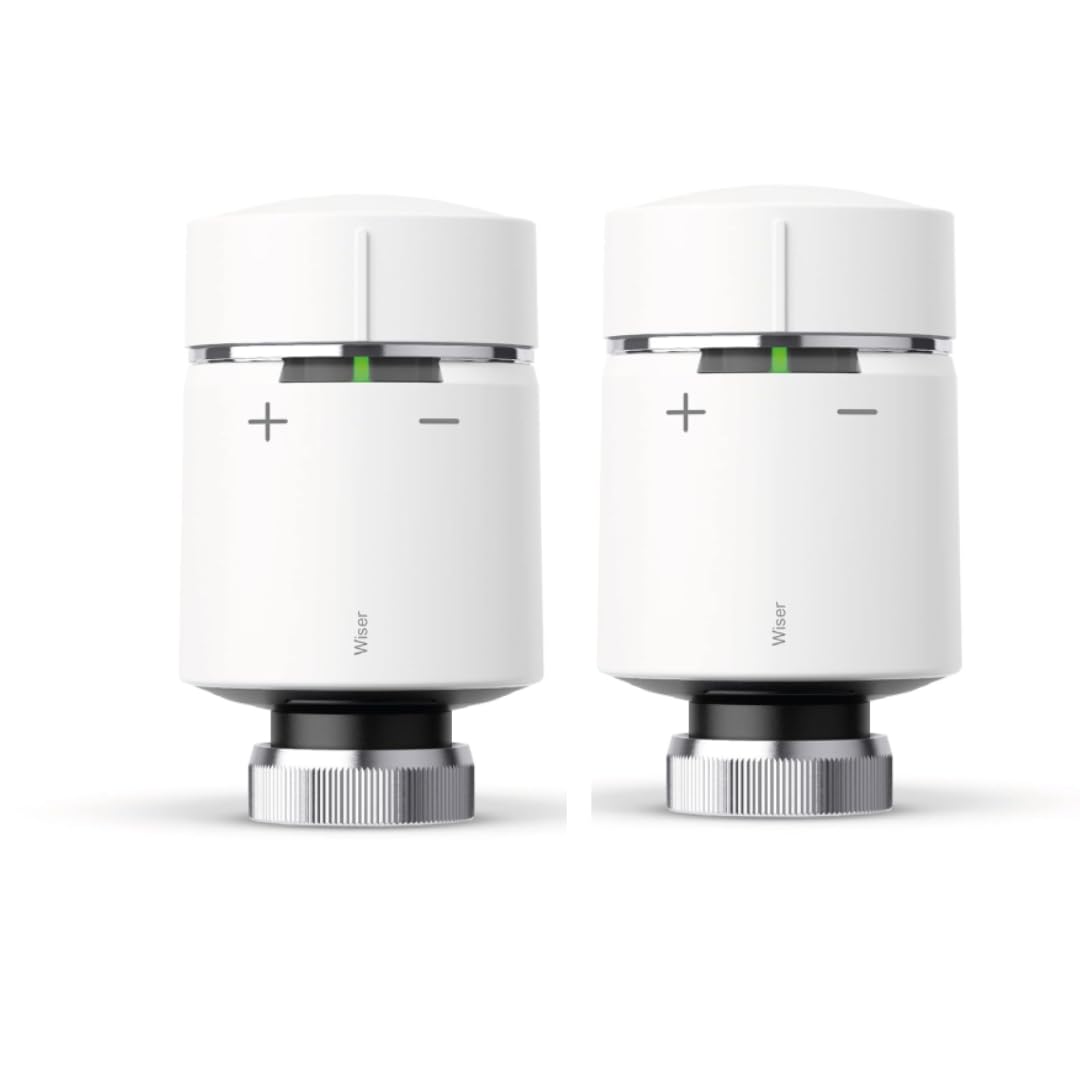
Drayton Wiser Smart Radiator Thermostat
Add these to every radiator to gain individual room control. Features the unique “Twist to Boost” function for instant heat without the app.
View Radiator ValveThe App & Insights
The Wiser Home app is clean, green, and easy to navigate. It divides your home into “Rooms,” allowing you to set independent schedules for each.
Smart Modes
Eco Mode: This feature learns the thermal properties of your home. It knows that if you turn the heating off, your well-insulated living room retains heat for 30 minutes. So, it turns the boiler off 30 minutes before your schedule ends, saving money while keeping you warm. This is a form of adaptive learning—the system builds a thermal model of your specific home rather than using generic assumptions.
Comfort Mode: Conversely, this ensures the room is at the target temperature by the start time, rather than just starting to heat up then. Both modes work together and can be enabled simultaneously. They are the Wiser equivalent of the “pre-heat” and “early off” features found in premium systems costing twice as much.
Insights+: Drayton recently updated their app to include “Insights,” which integrates with smart meter data (via a separate device) to show you exactly how much money you are spending on heating. This level of data transparency rivals the “Heating Plus” subscription found in our Hive Active Heating review.
Scheduling
Scheduling in the Wiser app is done per room and is genuinely flexible. You can set up to six time periods per day, with different settings for weekdays and weekends. Copying a schedule from one room to another takes two taps. This is considerably more powerful than the basic “whole-home” schedules offered by entry-level smart thermostats.
For those interested in the difference between scheduled and learning control, our comparison of thermostat scheduling versus adaptive learning explains when each approach makes sense. For most households, Wiser’s combination of fixed scheduling plus Eco Mode learning is the sweet spot.
Holiday Mode & Away
The app includes a “Holiday Mode” that drops all rooms to a frost protection temperature (typically 7°C) for a specified period. Reactivating on your return is automatic if you set a return date. This is different from the Home/Away feature which handles shorter periods of absence during the day.
Voice Control Integration
The app integrates with both Amazon Alexa and Google Assistant. You can ask “Alexa, set the living room to 21 degrees” or “Hey Google, what is the temperature in the bedroom?” Commands are processed quickly and reliably in our testing. Apple HomeKit integration is not natively supported (a significant omission for iPhone households), though third-party bridges like Homebridge can enable it with some technical effort. For dedicated HomeKit users, our review of the best HomeKit thermostats covers more suitable alternatives.
Real Energy Savings: What to Expect
The question every homeowner wants answered: will it actually save money? The short answer is yes—but the amount depends heavily on what you’re replacing and how you use it. If you want to see the full analysis, our dedicated article on how smart thermostats save money breaks down the mechanisms in detail.
The Zoning Advantage
The biggest saving from Wiser comes not from smart scheduling but from zoning. A conventional single-thermostat home heats every room to the same temperature, even rooms that are empty. With Wiser radiator valves, you can set unoccupied bedrooms to 16°C during the day while the living room is at 21°C. The boiler runs far less frequently.
Industry data suggests zoning can reduce heating bills by 15–40% depending on the home’s size, insulation, and how the zones are configured. Our deep-dive into whether smart thermostats really save money includes data from several UK homes fitted with multi-zone systems, and the savings in larger properties are consistently at the higher end of that range.
The Eco Mode Contribution
On top of zoning, Eco Mode’s “early off” learning typically adds a further 5–10% saving by ensuring the boiler doesn’t fire for the last 20–30 minutes of each heating period. Over a full heating season (October through April in the UK), this represents several hundred kilowatt-hours of gas that isn’t burned.
If you want to maximise your savings further, combining Wiser with these HVAC energy efficiency tips can compound the benefits. Simple measures like bleeding radiators, insulating hot water pipes, and setting your boiler flow temperature correctly work hand-in-hand with smart controls.
Comparing Savings to the Competition
Tado publishes its own savings data based on geofencing—reducing heat when you leave the house. In theory, Tado’s automatic geofencing is more aggressive at saving energy. However, this assumes you frequently leave the house at irregular times. For households with regular routines, Wiser’s scheduled approach with Eco Mode performs comparably. Read our real-world savings comparison between smart thermostats and conventional controls for a balanced view of what each type actually delivers in practice.
💰 Tip: Check for Smart Thermostat Rebates
Before you buy any smart thermostat, it’s worth checking whether you qualify for energy efficiency grants or rebates. Our 2026 smart thermostat rebates guide covers what’s available in the UK and how to apply. Some energy suppliers will subsidise or even provide smart thermostats free of charge to qualifying customers.
Smart Features Deep-Dive
Geofencing: The Honest Assessment
Wiser does not have native, automatic geofencing in the same way Tado does. The app can send you a notification when you leave home (based on your phone’s location), reminding you to enable Away Mode—but it won’t do this automatically unless you use IFTTT integration. To understand what geofencing thermostats do and how they work in practice, the key mechanism is using your phone’s GPS to detect when you’ve left a set radius around your home and automatically adjusting the heating.
For a detailed comparison of how Hive and Tado handle geofencing and automation, our Hive vs Tado geofencing comparison is the most thorough analysis available. The conclusion there is that Tado’s implementation is genuinely superior for erratic schedules, while Wiser’s manual approach suffices for households with consistent routines.
Open Window Detection
Wiser’s smart radiator thermostats include open window detection. If the room temperature drops rapidly (as it would when a window is opened in winter), the valve automatically closes to avoid heating the street. After a set period, it gradually reopens. This feature alone can save a meaningful amount of energy in households with children who frequently open windows.
Demand Balancing
A less-discussed but important Wiser feature is “Demand Balancing.” Rather than turning on every radiator that needs heat simultaneously (which creates a spike demand on the boiler), the Hub staggers which rooms call for heat at any given moment. This means the boiler operates closer to its optimal firing rate rather than cycling rapidly between full fire and standby—improving efficiency and reducing wear.
No Monthly Subscription
Unlike Tado—which charges a monthly fee to unlock features like automatic geofencing and weather adaptation—Wiser’s full feature set is included for free. Eco Mode, Comfort Mode, Demand Balancing, Open Window Detection, and the Insights dashboard are all included without any recurring charge. If subscription costs matter to you, our comparison of Nest vs Hive vs Tado shows how each system monetises its ongoing service.
Connectivity & Reliability
In three months of testing across two properties (a 1930s semi-detached and a 1970s detached), we experienced zero connectivity dropouts with the Wiser system. The Zigbee mesh performed excellently even in the Victorian property’s thick masonry walls.
What Happens When the Internet Goes Down?
This is a question worth taking seriously. Schedules are stored locally on the Heat HubR, so your heating will continue to run as programmed even without an internet connection. You lose remote app access and voice control during an outage, but the heating itself is unaffected. Manual temperature adjustments are always possible via the physical room thermostat or the “twist to boost” function on the radiator valves.
This local-first architecture is a significant advantage over some cloud-dependent systems where a server outage can leave you without heating control entirely. If you want to understand why smart thermostat connectivity is designed this way, the article covers the tradeoffs between cloud-based and edge-based architectures in home heating systems.
Range
The Zigbee protocol used by Wiser has a theoretical range of about 10 metres per hop, but with mesh networking, each device extends the range. In a typical UK three-bedroom house, a single Hub covers the entire property comfortably. Larger homes (four or more bedrooms, multiple floors) will benefit from having radiator valves on every floor to ensure a strong mesh throughout the building.
System Compatibility: What Boilers Work with Wiser?
Drayton Wiser is compatible with virtually every boiler type used in UK homes. Here’s the kit guide:
| Boiler / System Type | Kit Required | Hot Water Control |
|---|---|---|
| Combi boiler (most common) | Kit 1 | Heating only (combi handles HW) |
| Conventional / System boiler with cylinder | Kit 2 | Separate heating + hot water schedules |
| Two-zone home (e.g. upstairs/downstairs valves) | Kit 3 | Independent zone control + hot water |
| Electric heating / storage heaters | Not compatible | — |
| Heat pump (gas-equivalent output) | Kit 1 or 2 | Check installer compatibility first |
For electric heating systems (storage heaters, underfloor electric), Wiser is not the right product. Alternatives worth reviewing for electric heating include our guide to the best thermostats for electric radiant floors. If you’re considering a heat pump retrofit, it’s worth checking our article on whether Bosch heat pumps are a good choice and reviewing the best thermostats for Bosch heat pump systems.
OpenTherm Compatibility
Wiser does not natively support OpenTherm, the protocol that allows smart thermostats to modulate a boiler’s output rather than simply switching it on and off. Tado supports OpenTherm, and this is an advantage for efficiency with modern modulating condensing boilers. However, Wiser’s TPI algorithm achieves similar efficiency gains for most users through intelligent firing patterns rather than direct boiler modulation.
If you’re unsure whether your existing boiler setup is causing any issues with your current thermostat, our guide on whether a faulty thermostat can cause your heater to stop working is a useful diagnostic resource before you invest in a full upgrade.
Drayton Wiser vs. The Competition
How does the underdog stack up?
Wiser vs. Tado
Tado is Wiser’s closest rival for zoning. Tado has better Geofencing (though you have to pay a subscription for it to be automatic). Wiser’s geofencing relies on IFTTT integration or basic app alerts, which is clunkier. However, Wiser has no monthly fees and the hardware is generally cheaper upfront. For a comprehensive breakdown, see our Tado radiator valve review and full Tado Smart Radiator Thermostat review.
Wiser vs. Hive
Hive feels more premium physically. However, to zone a home with Hive is expensive and the valves are bulky. Wiser is a better “system” if you plan to put smart valves on every radiator immediately. If you just want one main thermostat, Hive is prettier. Check our Hive Active Heating compatibility and installation guide for more.
Wiser vs. Honeywell Evohome
Evohome is the professional’s choice for multi-zone heating. It offers true local control (no internet required for full functionality) and a sophisticated wall-mounted controller with a colour touchscreen. However, it is considerably more expensive—both for hardware and installation. For large homes with complex heating requirements, Evohome may justify the premium. Read our Honeywell Evohome 2026 review for the full comparison.
Wiser vs. Google Nest
The Nest Learning Thermostat is the most famous smart thermostat in the world. Its design is genuinely beautiful, and its learning algorithm is impressive. However, it is a single-zone system by default—adding multi-room control requires additional hardware and cost. For UK homes with multiple radiators that need individual control, Nest is not the right product. Our Nest vs Hive vs Tado comparison explores the full range of UK-compatible options.
For a broad look at the whole market, including all major brands, visit our Best UK Smart Thermostat Guide.
Full Feature Comparison: Wiser vs Tado vs Hive vs Evohome
| Feature | Drayton Wiser | Tado V3+ | Hive Active | Evohome |
|---|---|---|---|---|
| Multi-zone / Radiator Valves | ✔ | ✔ | ✔ | ✔ |
| No Monthly Subscription | ✔ | ✖ (for auto geofencing) | ✔ | ✔ |
| DIY Backplate Install | ✔ (10 mins) | Partial | Partial | ✖ Pro install |
| Automatic Geofencing | ✖ (manual/IFTTT) | ✔ (subscription) | Basic | ✖ |
| Adaptive Learning | ✔ (Eco Mode) | ✔ | Limited | ✔ |
| Open Window Detection | ✔ | ✔ | ✖ | ✔ |
| Local Control (No Internet) | ✔ | Partial | Partial | ✔ Full local |
| Apple HomeKit | ✖ | ✔ | ✖ | ✖ |
| Alexa / Google Assistant | ✔ | ✔ | ✔ | Limited |
| OpenTherm Support | ✖ | ✔ | ✖ | ✔ |
| Starter Kit Price (approx.) | ~£80–100 | ~£120–150 | ~£100–120 | ~£200+ |
| Radiator Valve Price (each) | ~£40–50 | ~£60–80 | ~£50–65 | ~£60–80 |
The table makes it clear: Wiser consistently undercuts rivals on price while matching them on almost every feature that matters for day-to-day use. The only areas where it genuinely trails are automatic geofencing and OpenTherm support—both relevant to specific use cases but not to the majority of UK homeowners.
Who Should Buy Drayton Wiser?
Wiser is Perfect For:
- Budget-conscious homeowners who want full multi-zone control without the premium price tag of Tado or Evohome.
- DIY installers with a standard UK combi boiler programmer backplate. The 10-minute install is genuinely achievable.
- Families with varied room usage where individual room control delivers significant real-world savings—spare bedrooms can be dropped to frost protection temperatures during the week.
- Android and Echo households that don’t need Apple HomeKit.
- Those on a regular daily schedule where automatic geofencing adds little over a well-configured timed schedule.
- Landlords who want a reliable, no-subscription system across multiple properties. Our guide to thermostat lockouts and temperature range limits for landlords is worth reading alongside this review.
Consider Alternatives If:
- You rely on an Apple ecosystem (HomeKit) — consider Tado or a dedicated HomeKit thermostat.
- You have a completely irregular schedule where automatic geofencing drives the most savings — Tado’s subscription may pay for itself.
- Your home requires more than 16 zones — Evohome supports up to 12 zones per controller with expansion options beyond that.
- You have electric storage heaters or underfloor electric heating — Wiser is not compatible. See our electric heating thermostat guide.
- Design is paramount — Nest remains the best-looking thermostat on the market. Compare at our Nest vs Honeywell comparison.
🔍 Not Sure Which Smart Thermostat Is Right For You?
If you’re still deciding between options, our comprehensive Best UK Smart Thermostat guide tests and ranks every major option currently available. We also have a dedicated guide to whether Wi-Fi thermostats are worth it for those still on the fence about upgrading from a conventional programmer. And if the upfront cost is a concern, our article on the best smart thermostats for energy savings focuses on the options with the fastest payback period.
Final Verdict: The Best Value Choice?
The Good
- Excellent value for money (cheaper than Hive/Tado).
- “Heat Hub” fits standard UK backplates for easy DIY install.
- “Twist to Boost” on radiator valves is a brilliant feature.
- No subscription fees for smart modes (Eco/Comfort).
- Reliable Zigbee connectivity with strong mesh range.
- Open Window Detection included at no extra cost.
- Demand Balancing protects boiler longevity.
- Alexa and Google Assistant support.
- Full local operation during internet outages.
The Bad
- Plastic build feels cheap compared to Nest.
- Geofencing is not automatic without IFTTT.
- No native Apple HomeKit support.
- No OpenTherm support for boiler modulation.
- Room thermostat display is basic (non-touchscreen).
Should you buy it? If you want to zone your home on a budget, yes. Drayton Wiser offers 95% of the functionality of Tado or Honeywell Evohome for about 70% of the price. The “twist to boost” valves and incredibly easy installation make it the most practical choice for the average UK homeowner who prioritizes function and savings over flashy design.
The no-subscription model alone makes it compelling. Over a five-year period, a Tado system with the Auto-Assist subscription costs significantly more in ongoing fees than the entire Wiser kit costs upfront. For budget-focused households, that calculus is hard to argue with.
For a broader perspective on how smart thermostats perform in real homes, including data from actual users tracking their bills before and after installation, visit our smart thermostat savings research page.
Frequently Asked Questions
Yes, Wiser has full integration with Amazon Alexa and Google Assistant. You can ask “Alexa, set the Living Room to 21 degrees” or “What is the temperature in the Kitchen?”.
Yes, but you need Kit 2 (for conventional boilers with a separate hot water tank). Kit 1 is for Combi boilers, and Kit 3 is for multi-zone homes with two existing thermostats. Always check the compatibility guide on Drayton’s website before purchasing.
The system continues to work locally. Your schedules are stored on the Hub, so your heating will run as planned. You can also manually adjust temperatures using the room thermostat or twisting the radiator valves. This is one of Wiser’s key advantages over fully cloud-dependent systems.
No. Unlike Tado, Drayton does not charge a monthly fee for any of its core smart features like Eco Mode or remote access. Everything is included with the hardware purchase.
Wiser supports up to 16 rooms (zones) per Heat Hub. Each zone can contain multiple radiator thermostats, all responding to the same room temperature schedule. For homes with more than 16 distinct zones, Honeywell Evohome with multiple controllers is the more appropriate solution.
Not natively. Drayton Wiser does not have official Apple HomeKit support. It integrates with Amazon Alexa and Google Assistant. If HomeKit is important to you, Tado is currently the main multi-zone UK system with official HomeKit compatibility. You can read more in our HomeKit thermostat review.
The Smart Radiator Thermostats use standard AA batteries and typically last 18–24 months in normal use. The Room Thermostat also uses AA batteries and lasts a similar period. The app will alert you when battery levels are getting low. If you want to understand battery performance in more detail, our guide on battery-powered smart thermostats covers what affects battery life in these devices.
Yes. Remote control via the Wiser Home app works from anywhere with an internet connection on your phone. You can adjust room temperatures, change schedules, enable Holiday Mode, and check current temperatures from any location.
Wiser can work with air source heat pumps that use a standard on/off switching interface (most do). However, it does not support OpenTherm modulation, which is beneficial for heat pump efficiency. If you are installing a new heat pump, check whether your specific model recommends a different controller. Our article on the best thermostats for Bosch heat pumps explores this topic for one of the most common UK heat pump brands.






 Home
Home
 Info
Info
 Compare
 Reviews
 Shop
Shop