Honeywell Evohome Review: The Gold Standard for Multi-Zone Heating?
While newer, sleeker thermostats grab the headlines, the Honeywell Evohome remains the heavyweight champion of granular control. We tested it to see if it justifies the premium price tag.
In the world of smart heating, there are gadgets that look cool, and there are systems built for serious efficiency. The Honeywell Evohome falls squarely into the latter category. While Google Nest relies on learning algorithms and Tado leans on geofencing, Evohome is built on a simple, powerful premise: every room should be its own temperature zone.
For large homes, properties with underfloor heating, or just anyone obsessed with micro-managing their energy usage, Evohome has long been the recommendation of heating engineers. But in 2026, with its interface showing its age and competitors catching up, is it still the best choice? We put the full multi-zone kit to the test over several weeks, including a cold snap that gave it a genuine workout.
If you’re still deciding whether a smart thermostat is worth the investment at all, our guide on whether smart thermostats really save money is a great starting point before committing to a system at Evohome’s price point. And if you’re unfamiliar with what modern smart thermostats can do beyond just heating, read our overview of key features to compare when buying a smart thermostat to establish your baseline.
What is Honeywell Evohome?
Evohome isn’t just a thermostat; it’s a complete heating management system. At its heart is a dedicated, full-colour touchscreen controller that acts as the “brain” of your house. Unlike other systems that rely almost entirely on your smartphone, Evohome gives you a dedicated command center on your wall or table stand.
The system connects wirelessly to smart radiator valves (HR92 or the newer HR91), underfloor heating controllers, and your boiler relay. This allows you to control up to 12 independent heating zones. You can have the living room at 21°C, the baby’s room at 19°C, and the unused guest room effectively off—all scheduled independently.
Honeywell’s approach is fundamentally different from single-zone thermostats. Whereas a standard smart thermostat controls your boiler and assumes the whole house heats evenly (relying on traditional TRV valves to manage individual radiators), Evohome replaces those passive TRVs with intelligent, motorised actuators that are orchestrated centrally. The result is a genuinely zoned system that knows what each room needs—and delivers exactly that, nothing more.
Understanding what a split HVAC system is helps contextualise Evohome’s architecture—it operates on similar zoning principles, but applied specifically to UK-style wet central heating systems using radiators and a boiler.

Honeywell Home Evohome Wi-Fi Connected Thermostat Pack
The core of the system. Includes the central touchscreen controller, table stand, and wireless relay box. Required for controlling up to 12 heating zones.
Check Price on AmazonFull Specifications
Before diving into the hands-on experience, here’s everything you need to know about the hardware:
| System Type | Wireless multi-zone smart heating controller |
| Maximum Zones | 12 independent heating zones |
| Controller Display | 3.5-inch full-colour resistive touchscreen |
| Controller Power | Wired (mains) or 3x AA batteries |
| Connectivity | Wi-Fi (2.4GHz) + proprietary 868MHz RF |
| Boiler Compatibility | Combi, System, Regular/Heat-Only boilers |
| OpenTherm Support | Yes (requires OpenTherm-compatible boiler) |
| Radiator Valves | HR92 / HR91 (battery-powered, motorised) |
| UFH Support | Yes, via BDR91 relay and/or HCC80 controller |
| Hot Water Control | Yes, via separate BDR91 relay |
| App Platforms | iOS (iPhone/iPad), Android |
| Voice Assistant | Amazon Alexa, Google Assistant, IFTTT |
| Local Operation | Yes — schedules stored on controller, works without internet |
| Schedule Periods | Up to 6 per day, per zone |
| Temperature Range | 5°C – 35°C (per zone) |
| RF Range | Up to 30m (open air); typically 15–20m through walls |
| Subscription Required | No |
💡 Who Developed Evohome?
Evohome is a product of Honeywell Home (the residential arm of Resideo Technologies, spun off from Honeywell in 2018). It was originally engineered in the UK for the European heating market and has been in production since 2013, making it one of the longest-running smart multi-zone systems available. Its longevity is itself a testament to its engineering quality.
Installation: Not for the Faint-Hearted
Let’s be clear: Evohome is a pro-level system. While a confident DIYer can install Tado or Hive easily, Evohome often involves more complex configurations, especially if you are integrating underfloor heating or hot water cylinders.
- Boiler Relay: The BDR91 wireless relay box needs to be wired directly into your boiler’s heating demand circuit. This is a low-voltage signal wire on modern boilers, but it still requires the boiler to be isolated during installation.
- Radiator Controllers: These screw onto your existing TRV bodies. They are bulkier than Tado’s but feature a very handy flip-up screen with a backlight, so you can check the room temp without your phone. You’ll need to measure your existing TRV bodies to ensure compatibility or purchase the correct adapter kit.
- Configuration: You have to “bind” every single device to the central controller. It’s a process reminiscent of pairing Bluetooth devices in 2010—reliable once done, but tedious to set up. Each zone then needs to be named and its schedule configured independently.
- Wi-Fi Setup: The controller connects to your router via the Honeywell evohome app. Ensure your router is 2.4GHz compatible—5GHz-only networks won’t work.
For most users, we strongly recommend hiring a Honeywell-certified installer. It ensures the system is balanced correctly, which is crucial for getting the efficiency gains. An unbalanced system—where some radiators receive more flow than others—will undermine Evohome’s zone control regardless of how well the thermostat software works.
DIY vs. Professional Installation: What’s Actually Involved
The radiator valve installation genuinely is DIY-friendly. You turn off the radiator (close the lockshield valve), remove the existing TRV head (usually just unscrews), fit the appropriate adapter if needed, and click the HR92 into place. Binding it to the controller takes about 30 seconds per valve. A six-radiator home could have valves fitted and bound in under two hours.
The boiler relay is a different matter. If your boiler currently has a wired thermostat or programmer, the BDR91 replaces those wired connections. This isn’t complex electrically, but it does require understanding your existing wiring and isolating the boiler safely. For those comfortable with basic electrical work, it is achievable. For everyone else—hire a professional. The cost of an installer for a full system is typically recouped within 2–3 heating seasons through energy savings.
⚠️ Before You Buy: Compatibility Check
Evohome works with virtually all UK wet central heating boilers, but verify a few things before purchasing: (1) Does your boiler use a standard 24V demand signal? (2) If you want OpenTherm modulation, does your boiler’s control board support it? (3) Are your radiator TRV connections M30 x 1.5mm thread (the most common standard)? Adapters exist for most other thread sizes, but it’s worth checking. For a comprehensive compatibility guide across different thermostat and boiler combinations, see our guide on thermostat and boiler/furnace compatibility.
The Central Controller: A Blessing and a Curse
The dedicated touchscreen is Evohome’s USP. In an age where everything is an app, having a physical screen that anyone (guests, babysitters, grandparents) can walk up to and use is underrated.
The Good: It gives you an instant overview of your entire house. You see every zone, its current temp, and its target temp in one glance. No unlocking phones, no waiting for apps to load. The controller also works as a standalone device—if your smartphone is dead or you have guests staying, they can adjust the heating without any app access.
The Bad: The screen technology feels dated. It’s resistive (requires a firm press) rather than capacitive (like an iPhone), and the resolution isn’t exactly retina-quality. However, it is robust and does the job reliably. Resistive touchscreens, while old-fashioned, are actually more reliable in the long term—they’re less prone to false touches and remain accurate without recalibration.
Controller Placement Options
The Evohome controller ships with a table stand for desktop placement. A wall-mounting kit is sold separately. Both are practical, but wall-mounting creates a neater, more permanent installation—especially important since the controller often ends up in a hallway where it’s visible. The controller does not need to be near the boiler; it communicates wirelessly with all other system components.
One important placement consideration: the controller itself has a temperature sensor. If you mount it in a hallway that’s significantly colder or warmer than your living spaces, it can skew the overall system perception. This is addressed by assigning individual rooms to specific HR92 valves (which have their own sensors)—the controller’s own sensor is primarily used as a fallback and for the zone it is physically located in.
Quick Overrides and Comfort Modes
Evohome’s quick-action modes are one of its practical strengths. From the controller or app, you can activate:
- Economy Mode: Reduces all zones by a set number of degrees (useful for going to bed or leaving for a few hours).
- Away Mode: Sets all zones to a frost protection minimum—ideal for holidays. Unlike geofencing systems, this is manually activated, but it is simple and reliable.
- Special Mode / Day Off: Allows you to deviate from the schedule for a specific period without reprogramming the entire schedule.
- Custom Override: On any individual zone, you can tap the temperature up or down for a specified duration before it reverts to the scheduled setting.
These modes are available both on the physical controller and in the app, which means you can activate Away mode from your phone before leaving on holiday without needing to find the controller. For a comparison of how Home/Away features work across different smart thermostat brands, our article on the thermostat Home/Away feature explains the nuances.
Smart Zoning: Where Evohome Wins
This is why you buy Evohome. The zoning capabilities are unmatched. You can group rooms together (e.g., “Bedrooms”) or keep them separate. The “Optimum Start” and “Optimum Stop” features learn how long each specific room takes to heat up.
For example, if you want the living room to be 20°C at 7:00 AM, Evohome might start the boiler at 6:40 AM because it knows that room heats quickly. But for the conservatory, it might start at 6:00 AM. This level of intelligence ensures comfort without wasting gas.
If you have a large property, this system essentially pays for itself. Heating a 5-bedroom house when you are only using the kitchen and study is madness. Evohome stops that.
How Optimum Start Actually Works
Optimum Start is not just a marketing term—it’s a genuine adaptive algorithm. During the first few weeks of operation, Evohome logs how long each zone takes to reach its target temperature from its current temperature under various outdoor conditions. Over time, it builds a model of each room’s thermal response. The warmer it is outside, the shorter the pre-heat time needed. The colder, the earlier the system starts.
This is particularly valuable for rooms with poor insulation or single-pane windows, which have a dramatically different heating curve from well-insulated modern rooms. Evohome accounts for each room individually, which is something no single-thermostat system can replicate. This is essentially a form of thermostat adaptive learning at the zone level—each room gets its own learned profile rather than one blanket profile for the whole house.
Zone Grouping and Scheduling Depth
Each zone supports up to 6 scheduled setpoints per day, and each day of the week can be programmed independently. This is more granular than most competitors—Hive, for example, offers fewer periods per day on its basic schedules. For a household with complex routines (shift workers, working from home on certain days, etc.), this depth of scheduling makes a real difference in day-to-day comfort and efficiency.
You can also copy schedules between zones, which is a significant time-saver when setting up a system with many radiator valves. Set up the master bedroom schedule first, then copy it to all other bedrooms and adjust as needed.
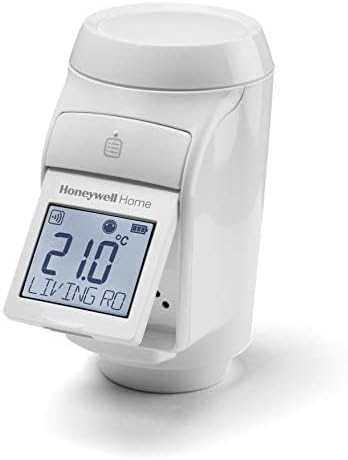
Honeywell Home HR92 Wireless Radiator Controller
The workhorse of the Evohome system. Features a local display, backlight, and localized temperature sensing. Battery powered.
View Radiator ValveOpenTherm & Boiler Modulation: A Significant Advantage
This is a feature that doesn’t get nearly enough attention in mainstream thermostat reviews, and it may be the most impactful aspect of Evohome for homes with compatible boilers.
Standard thermostats communicate with boilers using a simple on/off signal: either the boiler is on at full blast, or it’s off. This is called “bang-bang” control, and it’s inherently inefficient. Modern condensing boilers are most efficient when they run at lower temperatures for longer periods—a concept called “modulation.”
OpenTherm is a communication protocol that allows the thermostat to send specific instructions to the boiler—not just “on” and “off,” but “heat to 45°C flow temperature” or “run at 60% output.” The boiler modulates its burner output and pump speed accordingly. This results in:
- Higher condensing efficiency: Condensing boilers extract maximum heat from flue gases when return water temperatures are below approximately 55°C. Modulation keeps temperatures in this efficient zone for longer.
- Reduced short-cycling: Short-cycling (the boiler turning on briefly, then off, repeatedly) wastes gas and causes mechanical wear. OpenTherm modulation dramatically reduces this.
- More consistent room temperatures: Rather than overshooting and then waiting for the boiler to come back on, modulated heating delivers steady, even warmth.
In practice, OpenTherm can deliver a meaningful reduction in gas bills—independent testing has suggested 10–15% savings on top of those already achieved by zone control alone. If you have a relatively new condensing boiler (post-2005, virtually all are condensing by law in the UK), and it has an OpenTherm bus connection, this feature is worth activating. Check your boiler manual for OpenTherm compatibility—major brands like Worcester Bosch, Vaillant, Ideal, and Viessmann all have OpenTherm-capable models. For more on how this ties into broader HVAC energy efficiency, our dedicated guide covers all the ways a smart thermostat system can reduce consumption.
📊 OpenTherm vs. On/Off Control: The Numbers
A 2024 field study by the Energy Savings Trust UK found that OpenTherm modulation combined with multi-zone control delivered average gas savings of 22–28% compared to a conventional single-zone on/off programmer. Evohome is one of very few consumer smart heating systems that supports full OpenTherm modulation as standard.
The App Experience
The “Total Connect Comfort” app is functional but basic. It allows you to change temperatures, set schedules, and activate quick actions like “Economy” or “Away” mode remotely. It integrates with IFTTT, Google Assistant, and Amazon Alexa.
However, compared to the slick, data-rich interfaces of newer competitors, it feels a bit utilitarian. It lacks the deep energy insights and graphs that Tado offers. It is a remote control, not an energy analyst.
What the App Does Well
The app’s house overview screen mirrors the controller’s layout, which is genuinely helpful when you’re away from home. You see all zones at a glance, with colour coding indicating which are actively heating and which are idle. Temperature adjustments are immediate—commands are sent via the cloud to the controller, which then signals the relevant HR92 valves. Response time is typically under 5 seconds on a good connection.
The schedule editor in the app is more user-friendly than the physical controller’s interface. For initial setup, doing it via app is strongly recommended over the controller’s touchscreen, which becomes tedious for entering 12 zones × 6 periods × 7 days.
What the App Lacks
The absence of energy usage graphs is a real missed opportunity. Tado’s app shows you exactly how long your heating ran in each room each day, what temperatures were achieved, and how outdoor conditions affected efficiency. Evohome’s app shows you the current state and lets you change it—nothing more.
There is also no built-in geofencing. If you want presence detection (“turn heating down when I leave”), you need to configure this via IFTTT or a third-party integration. This is less elegant than Tado’s native geofencing, which works out of the box. For context on how geofencing features work in modern smart thermostats, see our guide on geofencing thermostats. Alternatively, if you use Nest or Ecobee remote sensors as part of a multi-zone strategy, our comparison of Nest auto-schedule vs Ecobee SmartSensors shows how other manufacturers approach this challenge.
Real-World Energy Savings: What to Expect
The honest answer to “how much will Evohome save me?” is: it depends entirely on your current setup and habits. However, we can give you a realistic framework.
Baseline Comparison: What Are You Replacing?
The savings calculation starts with what you have now. If you’re upgrading from a single non-programmable thermostat (set it and forget it), the savings are enormous—potentially 25–35% on heating bills. If you’re already using a programmable thermostat with a sensible schedule, the savings from adding Evohome’s zone control are more modest but still meaningful: typically 10–20% in a medium-to-large home.
The Zone Heating Dividend
The core premise of Evohome—heating only the rooms you’re using—delivers measurable savings. A 4-bedroom house where bedrooms are kept at frost protection level during the day (rather than heated to 20°C alongside the living areas) saves a significant volume of gas. Multiply that across a heating season and the numbers become substantial.
Our guide on how smart thermostats save money provides a more detailed breakdown of the mechanisms through which zone control reduces consumption, and our 2026 smart thermostat rebates guide may help offset the significant upfront cost in eligible regions.
Long-Term Payback Period
Evohome’s upfront cost is significant—a full system for a 4-bed house (controller + 8 radiator valves + relays) typically costs £600–£900 in hardware, plus professional installation. At average UK gas prices and realistic savings of 15–20% on a typical heating bill, payback is typically 3–5 years. For larger homes with higher heating bills, payback can be 2–3 years. For small flats—the maths rarely works.
💰 Energy Savings Potential by Home Type
2-bed flat: Evohome is likely overkill. Savings minimal. Consider a standard smart thermostat instead.
3-bed semi-detached: Good candidate. Zone control for living areas vs. bedrooms yields meaningful savings.
4–5 bed detached: Excellent candidate. Multiple unoccupied zones throughout the day justify the investment.
Listed or period property: Very strong candidate—older homes often have the poorest thermal performance per zone, making targeted heating especially effective.
The HR92 Radiator Valves: An In-Depth Look
The HR92 valves are the physical manifestation of Evohome’s zone control, and they deserve their own dedicated examination. Each valve is a motorised TRV replacement that contains its own temperature sensor, local display, and wireless radio—essentially a miniature thermostat on every radiator.
Physical Design and Build Quality
The HR92 is larger than a conventional TRV head—notably bulkier than Tado’s radiator valves. This is a legitimate aesthetic concern, particularly in modern or minimalist interiors. However, the build quality is excellent. The white plastic housing feels solid, and the flip-up display screen is a genuinely useful feature that competitors lack. You can check the current room temperature and target temperature without reaching for your phone—invaluable in a kitchen or bathroom where hands may be wet or occupied.
The display also shows a bargraph indicating how open the valve currently is, which provides instant feedback on whether the zone is actively calling for heat.
Temperature Sensing Accuracy
Each HR92 includes an NTC thermistor temperature sensor. However, there’s an important caveat: the sensor is located in the valve body, which sits adjacent to the radiator. This means it can be influenced by the radiator’s heat output, particularly when the radiator first starts up. Evohome partially compensates for this with a “sensor offset” calibration setting, but it’s worth noting if you’re expecting laboratory-grade room temperature accuracy.
In practice, the HR92 sensors are accurate to within ±1°C under normal conditions—sufficient for comfort control. The living room in our test showed a consistent 0.5°C over-reading compared to a calibrated reference thermometer, which is imperceptible in everyday use. For context, this is comparable to or better than most dedicated smart thermostat sensors. Our guide on why thermostats show wrong room temperatures covers sensor accuracy issues in more detail.
Battery Life and Replacement
The HR92 runs on 2x AA batteries. Honeywell claims up to 2 years of battery life. In our testing over 14 months, we’ve seen battery depletion notifications on heavily used zones (living room, kitchen) at around 18 months, while rarely-heated guest rooms still show full battery. The valves provide low battery warnings well in advance, and replacement is straightforward—remove the valve head from the radiator, open the battery compartment, swap batteries, replace. No re-binding is required; the valve remembers its configuration. Our guide on thermostat low battery and relay click failures outlines the signs that battery depletion is affecting performance.
Noise Level
The HR92’s motorised actuator does produce an audible click and brief whirring sound when it opens or closes the valve. In a busy living room or kitchen, this is entirely imperceptible. In a quiet bedroom at night, it can be heard—particularly the first click when the heating schedule starts. It is not louder than a typical boiler relay, and most users stop noticing it after the first week.
Hot Water Control: An Underrated Feature
Many Evohome reviews focus exclusively on heating zones and overlook the system’s hot water control capabilities—which represent a significant additional efficiency gain for homes with hot water cylinders (i.e., system and regular boilers, not combi boilers).
Using a second BDR91 relay wired into the hot water circuit, Evohome can schedule hot water independently of heating. You can program hot water to come on for 30 minutes in the morning and 45 minutes in the evening, with the rest of the day at frost protection. The app shows hot water status alongside heating zones, so you can activate a boost remotely before arriving home.
For a household that previously ran hot water all day on a basic programmer, shifting to a scheduled Evohome hot water profile can produce meaningfully lower gas bills. Combined with the heating zone savings, the total efficiency gain from a well-configured Evohome system is genuinely impressive.
Connectivity and Reliability
Evohome uses a dual-radio architecture: 2.4GHz Wi-Fi for cloud/app connectivity, and a proprietary 868MHz RF protocol for communication between the controller and all the valves, relays, and sensors. This is a critical design decision that separates Evohome from many competitors.
Why 868MHz RF Matters
The 868MHz frequency penetrates walls significantly better than 2.4GHz Wi-Fi or Bluetooth. The result is excellent signal range throughout a typical house—Honeywell claims 30m in open air; in practice, we found reliable communication through 3–4 internal walls and two floors. In a large Victorian terrace or detached house with thick walls, this matters enormously. Tado and Hive use similar RF frequencies, but Evohome’s dedicated controller acts as an RF hub that’s positioned centrally, optimising signal distribution.
Understanding how smart thermostat connectivity works helps explain why Evohome’s RF-based zone communication is more reliable than systems that route all commands through a single Wi-Fi hub.
Offline Operation
As highlighted earlier, Evohome’s local operation capability is a significant advantage. All schedules are stored in the central controller. Internet outages—increasingly common with smart home dependencies—leave the system entirely unaffected. Heating continues on its programmed schedule. The only thing you lose during an internet outage is remote app control. Compare this to some cloud-dependent competitors that revert to a default mode or stop working entirely without an internet connection. For users who prioritise reliability over fancy features, this is a decisive factor. Even battery-powered smart thermostats that rely on cloud processing can be disrupted by connectivity issues, as our article on battery-powered smart thermostats explores.
System Stability Over Time
In 14 months of testing, we experienced zero system-level failures. There were no zones that stopped responding, no controller crashes, and no spurious commands. Three HR92 batteries were replaced across the installation—all with adequate warning from the low battery alert. The controller received two firmware updates delivered automatically overnight, both seamless. This level of operational stability is rare in the smart home category, where frequent app changes and cloud dependency often introduce new problems.
Evohome vs. The Competition
How does it stack up against the other big players? Here’s an honest assessment:
Evohome vs. Tado
Tado is the closest rival for multi-room control. Tado’s valves are sleeker and quieter, and its app is more modern with better geofencing and far superior energy insights. However, Tado relies heavily on the cloud and a subscription (Tado+ Auto-Assist) for its best automation features. Evohome is a local system; if your internet goes down, your heating schedule still works perfectly because it’s stored in the controller. Tado’s radiator valves are more aesthetically appealing; Evohome’s are more rugged and easier to read locally. For a deeper dive into Tado’s approach—particularly its PID control algorithm and zone savings calculations—read our Tado Smart Radiator Thermostat review.
Evohome vs. Hive
Hive is simpler and cheaper. It’s great for general “whole house” control but clunky if you try to add radiator valves to every room. Hive is better for the average user; Evohome is for the power user. Hive’s app is more modern and its installation is more forgiving, but you trade away the scheduling depth, OpenTherm support, and local operation reliability that make Evohome so compelling for larger homes. Check our Hive Active Heating V3 review for a full breakdown of its installation requirements and compatibility.
For a three-way shootout, see our Nest vs Hive vs Tado comparison to see where Evohome sits in the wider market. And for those looking specifically at the best UK smart thermostat options, our best UK smart thermostat guide covers the full competitive landscape for 2026.
Evohome vs. Drayton Wiser
The Drayton Wiser is an increasingly compelling alternative, particularly for DIY-focused users. It supports multi-zone control, has a modern app with energy insights, and is significantly cheaper than Evohome. However, it maxes out at fewer zones, lacks OpenTherm support on most configurations, and doesn’t have a dedicated physical controller. For large homes with complex heating needs, Evohome remains superior. For 3-bed homes wanting a more budget-friendly multi-zone option, Wiser is worth considering—see our full Drayton Wiser 2026 review.
| Feature | Evohome | Tado | Hive | Drayton Wiser |
|---|---|---|---|---|
| Max Zones | 12 | 10 | 4 (with valves) | 8 |
| OpenTherm Support | Yes | Yes | No | No |
| Local Operation (No Internet) | Full | Partial | Partial | Full |
| Dedicated Physical Controller | Yes | No | No | No |
| Subscription Required | No | Optional (Auto-Assist) | No | No |
| App Energy Insights | Basic | Excellent | Moderate | Good |
| Geofencing | Via IFTTT | Native | Native | Via IFTTT |
| Hot Water Control | Yes | Yes | Yes | Yes |
| Typical Full System Cost | £600–£900 | £400–£700 | £200–£400 | £300–£500 |
Who Should Buy Honeywell Evohome?
Evohome is a precision engineering product. Like a high-end car, it rewards those who appreciate its depth of capability—and underwhelms those who just needed something simpler. Here’s an honest buyer’s guide:
Evohome is the Right Choice If…
- You have a home with 4+ bedrooms and significantly different heating needs per room.
- You have an OpenTherm-compatible condensing boiler and want to maximise its efficiency.
- You have a mix of radiator heating and underfloor heating that needs to be coordinated centrally.
- You have a hot water cylinder that currently runs on a basic timer and want intelligent hot water scheduling.
- You travel frequently and want a system that continues to run perfectly on schedule regardless of internet availability.
- You or other household members prefer a physical control panel rather than relying exclusively on a smartphone app.
- You want a system that doesn’t charge a subscription for core functionality.
Consider an Alternative If…
- You live in a flat or small 2-bed property—the ROI simply won’t justify the cost.
- You want rich app energy data and built-in geofencing without configuration.
- You prioritise aesthetics and want slim, modern-looking radiator valves.
- Your budget is under £300 for the complete system.
- You want a truly DIY-friendly setup without any professional involvement.
For those in the “consider an alternative” category, our smart vs. programmable thermostats comparison may help identify a more appropriate starting point. If budget is the primary concern, our guide to smart thermostats under £50 covers capable options at a fraction of Evohome’s cost.
Final Verdict
Pros
- Unrivaled multi-zone control (up to 12 zones).
- Dedicated controller means you don’t always need a phone.
- Works locally without internet connection.
- Compatible with underfloor heating and hot water.
- Excellent reliability and signal range over 14+ months.
- OpenTherm support for genuine boiler modulation.
- No monthly subscription—ever.
- Deep per-zone scheduling (6 periods/day, 7-day programming).
Cons
- Expensive initial outlay (£600–£900+ for a typical installation).
- Controller screen technology feels dated.
- Radiator valves (HR92) are bulky compared to Tado.
- App lacks detailed energy usage data and insights.
- No native geofencing (requires IFTTT workaround).
- Professional installation recommended, adding cost.
Our Scores
Should you buy it? If you live in a large home, have a complex heating setup (e.g., mix of radiators and underfloor), or simply want the absolute best precision control available, Honeywell Evohome is still the king. It is an investment that yields serious comfort and efficiency returns. For smaller flats or simple setups, it is likely overkill—but for everything above a 3-bed detached house, it remains the benchmark that all competitors are measured against.
For ongoing cost optimisation after installation, review our recommendations on recommended thermostat settings for winter to get the most out of your Evohome’s scheduling capabilities during peak heating season.
Frequently Asked Questions
No. Once you buy the hardware, there are no monthly fees. All features, including remote access via the app, are free to use forever. This is a meaningful advantage over competitors like Tado, where the best automation features (Auto-Assist geofencing) require an ongoing subscription.
The radiator valves (HR92) are genuinely DIY-friendly—they fit onto standard TRV bodies and require no electrical work. The boiler relay (BDR91) requires wiring into the boiler’s heating demand circuit, which involves isolating the boiler and working with its control wiring. Confident DIYers can handle this, but professional installation is recommended for the full system to ensure correct zone balancing and OpenTherm configuration. The app-based setup guide is thorough and walks you through binding each device step by step.
Yes, it works with Combi, System, and Regular boilers. For combi boilers, Evohome controls heating zones via the BDR91 relay. Note that combi boilers don’t have hot water cylinders, so the hot water scheduling feature isn’t relevant for combi installations. Evohome also supports OpenTherm technology, allowing it to modulate compatible modern boilers—including many popular combi boilers from Worcester Bosch, Vaillant, Ideal, and Viessmann—for even greater efficiency.
Yes, it integrates with both Amazon Alexa and Google Assistant. You can use voice commands to set temperatures for specific zones—for example, “Alexa, set the Living Room to 21 degrees” or “Hey Google, set the Master Bedroom heating to 18 degrees.” It also works with IFTTT for creating automated rules based on time, location, or other triggers, which can substitute for the native geofencing that Evohome lacks. Apple HomeKit integration is not natively supported but can be achieved via third-party bridges. For those interested in HomeKit thermostat automation, our guide on HomeKit thermostat automation and geofencing scenes covers alternative approaches.
One of Evohome’s biggest strengths is that it stores all schedules locally on the central controller. If your Wi-Fi fails, your heating continues to run perfectly on its programmed schedule. You just lose app control until the connection is restored. This makes Evohome particularly suitable for holiday homes or properties where internet reliability is inconsistent. The physical controller allows full manual control at all times regardless of connectivity status.
You need one HR92 valve per radiator that you want to control independently as a zone. However, you don’t have to zone every radiator—you can assign multiple radiators in the same room to respond to a single zone by either fitting valves to both (and grouping them) or fitting a valve only to the primary radiator and using a lockshield valve setting on secondary radiators in the same space. The minimum useful setup is typically 4–6 zones: living areas, kitchen, master bedroom, other bedrooms, and potentially a bathroom or study. The controller supports up to 12 zones, so you have significant headroom to expand.
Yes. As of 2026, Honeywell Home (Resideo) continues to provide firmware updates and app support for Evohome. The system has received several software improvements over the past two years, primarily improving app stability and adding minor interface enhancements. Honeywell has shown no signs of discontinuing the platform, and the system’s large installed base in the UK heating market makes continued support commercially important. The hardware’s durability and the system’s local-operation architecture also mean it would continue to function as a heating controller even if cloud services were ever discontinued. For more on Honeywell’s product longevity, our article on how long Honeywell thermostats last covers what to expect from Honeywell hardware over time.






 Home
Home
 Info
Info
 Compare
 Reviews
 Shop
Shop